.png?width=202&height=50&name=Logo%20(1).png)
Access Settings Requirements
- User must be a Company Admin
- Navigate to the Global Settings page
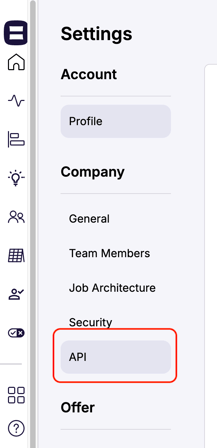
Step 1: Go to API Settings Section
- Once you're on the Settings page, scroll to the bottom left-hand section.
- Select the "API" option.
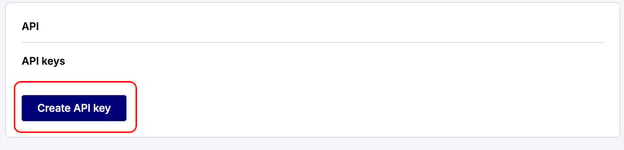
Step 2: Generate a New API Key
- Click the "Create API Key" button to generate a new API Key.
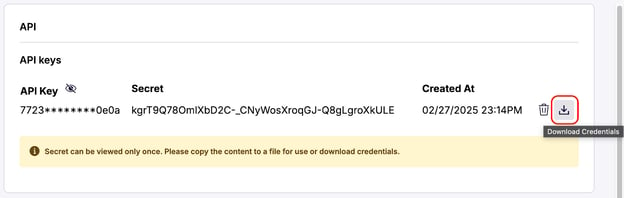
Step 3: Save the New API Key
- A new API Key and Secret will be generated.
- Save the new API Key immediately. Copy the Secret to a secure location for future reference.
- Use the download button next to the trash bin icon to easily save the credentials to your device.
Step 4: Identify your Data Connections
-
Access your Pequity API connections
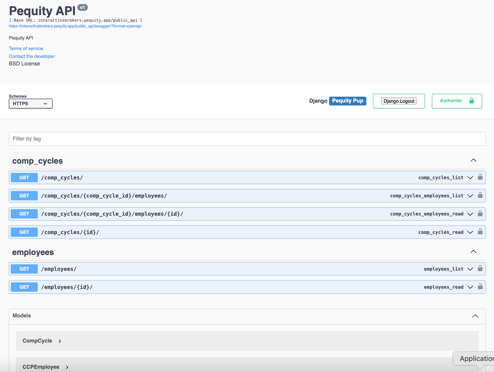
Note: An IT or Technical Support team would be helpful for external tool connections.
Important Notes:
- Once an API Key is created, it will be hidden the next time you visit the page. Be sure to save it right away.
- The Secret can only be viewed once, so be sure to copy it or download the credentials for future use.
- Only Admin Users can API Keys.