.png?width=202&height=50&name=Logo%20(1).png)
Using Placeholders
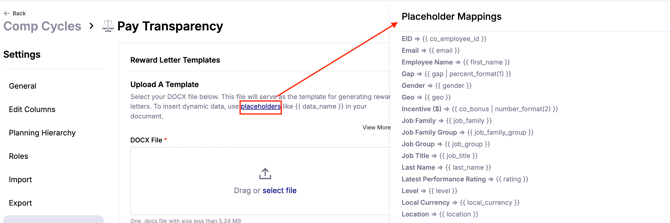
Reward letters use placeholders to automatically pull data fields from the workbook. You can find these placeholders in the Cycle's Settings page > Reward Letter Templates tab > Placeholders linked text.
Formatting Decimal, Currency, or Percent Fields
When the field you want to pull is a decimal, currency, or percent, the placeholder includes a formatting option:

Here’s how it works:
-
number_format(2)→ Displays 2 decimal places -
number_format(0)→ Displays no decimal places -
number_format(4)→ Displays 4 decimal places
Adjust the number inside the parentheses to control how many decimal places appear in the reward letter.
Examples
-
Salary with two decimals:
current_salary | number_format(2)→ 50,000.00 -
Salary with no decimals:
current_salary | number_format(0)→ 50,000 -
Percentage with four decimals:
bonus_percent | number_format(4)→ 12.3456%
Key Notes
-
Use
number_format(n)to control decimal precision. -
Replace
nwith the number of decimal places you want. -
This applies to any decimal, currency, or percent field in your reward letters.